


blessingx
High Rollers
-
Joined
-
Last visited
Everything posted by blessingx
-
Starting off a sunny Saturday morning right.

-
Now it seems like I’m obsessing, but Phoebe Waller-Bridge was just brought in to spice up the next Bond film script. “There’s been a lot of talk about whether or not [the Bond franchise] is relevant now because of who he is and the way he treats women,” she says. “I think that’s bollocks. I think he’s absolutely relevant now. It has just got to grow. It has just got to evolve, and the important thing is that the film treats the women properly. He doesn’t have to. He needs to be true to this character.”
-
-
Yeah, the series was really something. This though just appeared in the New Yorker and worth a read... https://www.newyorker.com/news/our-columnists/what-hbos-chernobyl-got-right-and-what-it-got-terribly-wrong
-
If growing up in certain parts of the country and you liked cooling off on hot summer days with ice cream at a Friendly’s, you should know its co-founder, Curtis Blake, just died at 102 (his brother, the other co-founder, is still going at 104). Ice cream diet here I come. https://www.nytimes.com/2019/05/30/obituaries/curtis-blake-dies.html?smid=nytcore-ios-share
-
A depressing article titled How Many Bones Would You Break to Get Laid?
-
-
It also made me think quite a bit about Fukushima (although more limited in scope). More than a few similarities makes one wonder how far we’ve come (when things go really, unexpectedly bad). Also... https://www.instagram.com/explore/locations/507277779/chernobyl-exclusion-zone/
-
HBO’s Chernobyl. Not fun times.

-
I think she worked on the second season of Fleabag and the first of Killing Eve at the same time. I thought I was busy. Like many shows, Fleabag is getting a cultural translation. Kind of. A French faithful adaptation. I know I'm being naive, and this is likely just about native positioning and cash, but have you heard of stranger, lighter, justification for adapting? It's even the same song!
-
Don’t forget the doc 30th Century Man. It’s on Prime.
-
We need more of these.

-
Hope it was a great not yet 50 Rob.
-
Okay, the same weekend GoT finishes, the second and last season of Fleabag hits Amazon Prime (it’s already aired in Britain). Can we now call it the best thing on TV? Know there are other fans here, including Stretch, and suspect there would be many more given the chance.
-
Mad dash at the end. Here's my unuseful take (as an inner spring preference side sleeper)... Best: Hästens Most Loved: McRoskey Most Confusing: Duxiana Great, But Always Too Close to a Hästens: Vispring And of course the above have almost nothing in common with each other. In the end we went bang-for-buck and joined the Aireloom club. Ronald Reagan and I finally have something in common. Aireloom Midnight Preferred Ingraham
-
Laura Stevenson - The Big Freeze
-
Out of all the possibilities tonight, hadn’t considered...
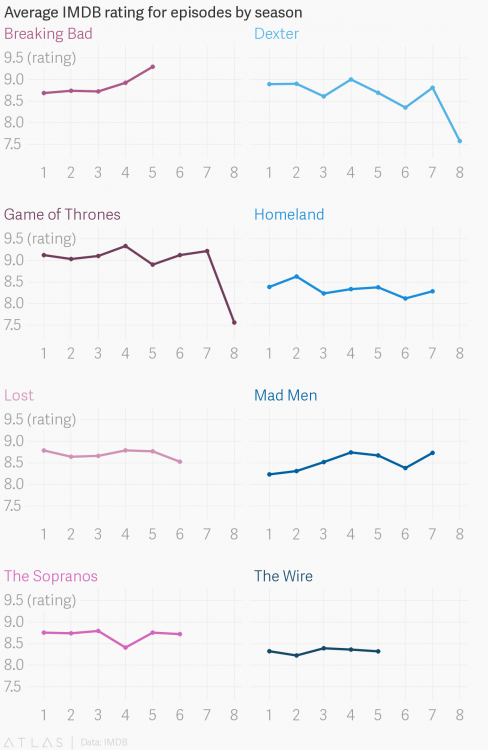
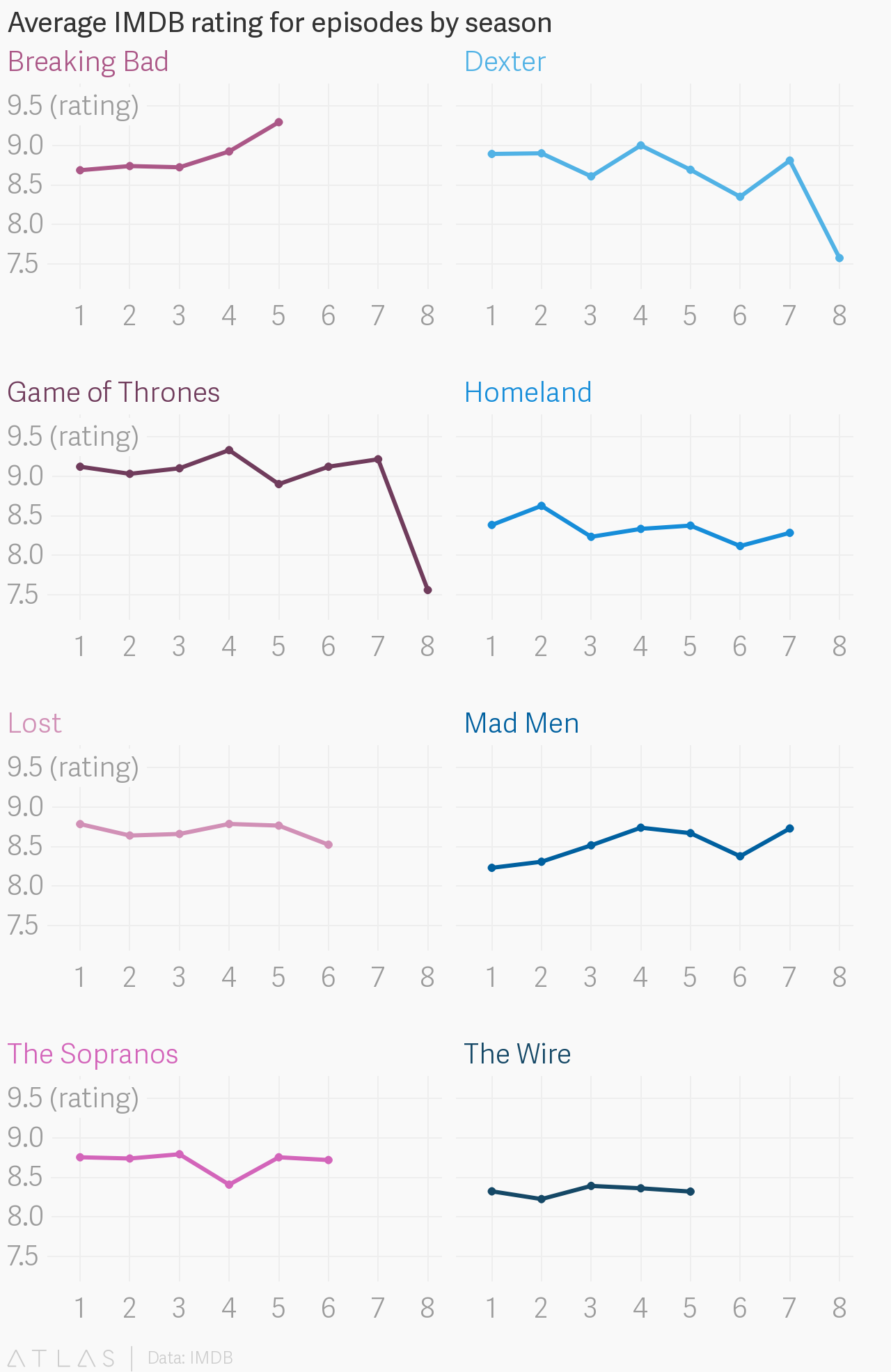
 Good read and thanks for posting, but there's one kinda significant misconception (inside this Twitter thread and out) - the show runners were always in control. They were responsible for plot & adaptations choices and pacing structure in seasons 1, 2, 3, 4, 5, 6, 7, and 8. They made arc constructions around renew cycles with HBO, supposedly they played a big part in deciding to end things on season 8. This is all, of course, simplifying things more than a bit (and the successes of this show were so many), but give them the benefit of the doubt on season one where they didn't even get a wrap party (and had a natural seasonal arc), what were their pacing and landing plans from the first renewal on? Also Argentina.Nice score and especially congrats on the Aireloom.I agree, though you have to spin it around and embrace the same criticism and disconnect also the "It's good because I like it" position, which, to be honest, probably accounts for many of our posts in the Entertainment forums, no? The pacing of the early seasons were glacial, like Mad Men or LotR glacial, though obviously lots of people liked that here. I suspect that's part of the reason all the rushed missed landings of the current season, feels especially abnormal. I will say no matter how you view it, the couple female spurned lover storylines recently, or maybe more accurately story order (reject, then boom!), were big mistakes in comparison all the careful and successful positioning of female characters in what would likely naturally have been an overwhelming male epic. Again switch order slightly and give it a bit more time.https://qz.com/quartzy/1618479/data-show-game-of-thrones-is-taking-a-historic-critical-nosedive/
 Doug, this being Head-case, did you go with a Vividus model? I gotta try one of theirs. Stretch, the great thing about the Natural Mattress store in Palo Alto is they have five other lux mattress stores within four blocks and two general dealers in a couple miles. Easy to do lots of trials. I'm sure the best way to shop for a mattress, like everything, is through marketing videos, so here are a few for future hunters that I came across... And my favorite... Bonus: https://vimeo.com/138767306Let's bump this thread again (thanks Shelly). After 18 years on a McRoskey, we're looking for a new mattress. We've tried The Natural Mattress Store's latex and hybrids, Nest Beddings various offerings, many of Tempur-Pedic's 20 models, Kluft's Cashmere/Mohair/Alpaca/gold leaf craziness, a few of the S's (Serta/Sterns/Sealy/Simmons), and we're running out of steam. It does seem we're most comfortable with a traditional mattress, though with the amount of layers and hybrid technologies in most of these I'm not sure the strict division still exists. We're starting to lean back to McRoskey (new wool model) or possibly Aireloom (Kluft without as much $parkle), though open to new suggestions if anyone has any (thanks most recently Doug - Hastens looks very interesting and there’s a showroom nearby, though I see we’re above DUXIANA in outlay)? I'm not sure who decided Memorial Day was best honored with mattress sales, but there's that now, however mattresses are the one thing I don't like to skimp on. Any thoughts?Great NYT revisionist piece - Doris Day: A Hip Sex Goddess Disguised as the Girl Next Door And we shouldn’t forget those who literally jump on grenades for others - Robert Maxwell, World War II Hero Who Fell on a Grenade, Dies at 98






Important Information
By using this site, you agree to our Terms of Use.